Features

The short version up top, the full detail below.

  • Pipelined NNTP at line rate: 9.0-9.3 Gbps measured on a 10 GbE line whose own ceiling is 9.8.
  • One-pass pipeline: decode, verify and extract overlap; RAR volumes never touch disk; nested archives unpack in the same pass.
  • Multi-provider union availability: complete from the union of your servers, or abort early.
  • Memory budget: bounded RAM, graceful spill, never swaps.
  • Crash-safe resume: article-level journal; kill −9 mid-job and it picks up where it left off.
  • SABnzbd-compatible + NZBGet JSON-RPC APIs: Sonarr/Radarr/nzb360/LunaSea work unmodified.
  • Built-in indexer (optional, off by default): scan groups into a local, searchable, Newznab-serving index. Real filenames only, so keep your commercial indexers.
  • Poster wall: artwork, ratings, cast, episode grids; no API keys.
  • Watchlist auto-grab + quality upgrades: grab on first appearance, upgrade to target quality.
  • Single self-contained executable: par2 + RAR unpack embedded.

Engine & speed

  • Pipelined NNTP. Keeping several requests in flight per connection beats both round-trip latency and TCP congestion-window decay. We measure +64% to +270% over serial fetching, replicated at every round-trip time from a 14 ms datacentre link to 63 ms satellite.
  • SIMD yEnc decode (rapidyenc, with NEON and AVX kernels) runs at 4.95 GB/s per core, decoded in place as the bytes land in the receive path.
  • Multi-server shared queue. Providers self-balance to within ~2% with no tuning. Each one's real rate is tracked, and the tail of a job is duplicate-dispatched so a single slow server can't drag out the finish.
  • Cross-job soak. The tail of job N overlaps the start of job N+1, so the line stays lit edge to edge across a whole queue: 2% idle here versus SABnzbd 5.0.4's 61% dark in the same bench.
  • Slow-job watchdog. A download crawling on one slow server while the rest sit idle gets bumped to the back of the queue, progress kept, and resumes once the queue clears.
  • Idle-server prefetch: a server the active job can't use, because its articles aren't stored there, starts on the next queued job instead of sitting idle.
  • Connection-tuning ladder. Rather than guess, it measures where each provider's throughput actually stops climbing (connections asked for versus granted) and settles there.
  • Auto-speed governor: an optional LEDBAT-style RTT governor that yields to the rest of your household's traffic and takes what's left of the line.
  • Speed limits and a weekly scheduler: live-adjustable caps, a local-time (DST-safe) schedule, and a "pause for N minutes" that resumes on its own.
  • Memory budget. One global RAM budget (auto: a quarter of RAM, capped, overridable). As it tightens, buffers shrink first, then data spills to disk and reads back once the job settles. It never swaps. A 190 GB job finishes inside a 1 GB budget at ~1.1 GB peak RSS, and there's a measured, documented 2 GB profile for NAS boxes.
  • Backpressure. A slow disk throttles the sockets instead of letting RAM fill. It holds within ±1% of a write cap, and RAM actually falls under pressure.
  • Post-job memory trim: once a job finishes and the daemon falls idle, the buffers and caches it grew are handed back to the OS instead of being held for the next one.

The one-pass pipeline

  • Write once. Decoded articles are pwritten straight to their final file offsets. No temp files, no separate assembly pass.
  • In-stream PAR2 verification. Every block is MD5-hashed from the decode buffers as it arrives, so verification finishes the moment the download does. That beats the quick-check the other clients settle for, and it costs nothing.
  • Direct extraction: RAR, 7z and zip posts are mapped and extracted while they download, stored and compressed alike, so the volumes never land on disk at all. Disk written comes to content × 1.0 and disk needed to 1×, where others want roughly 2×.
  • Nested archives, and depth barely costs anything. Archives inside archives - RAR in RAR, 7z inside RAR, ladders many levels deep - are denested as the bytes arrive, inside the pass we were already making. That is the whole difference: a client that writes each layer out, closes it, reopens it and scans it again pays a fresh pass for every level, so each layer it goes down costs it another round trip through the disk. Ours ride along in the first pass, and the payload comes out of a ten-level ladder the same way it comes out of a one-level one. One copy on disk where write-out-and-rescan holds two or three.
  • Deobfuscation. Obfuscated posts are renamed from their PAR2 metadata, ROT13-scrambled names get rescued, and hash-named junk is classified and gated out.
  • Plain split files. Sets split the HJSplit way, into .001/.002 or .1/.2 parts with no archive header at all, are recognised and joined back into the original file rather than landing on your disk as loose parts.
  • Exact-fit repair. Damaged blocks are known as they happen, so only the minimum-byte set of recovery volumes gets fetched (a knapsack solve) and repair touches nothing but the damaged spans.
  • RAR recovery records. When PAR2 is exhausted, or was never posted, embedded RAR recovery records and separate .rev recovery volumes repair damaged volumes in place.
  • Repair at every depth. A PAR2 set packed inside an inner layer is found and run at its own level, and a par-only post (data deleted, a 100%-recovery set left behind) is rebuilt whole and then unpacked.
  • Compressed and encrypted, in the same pass: compressed sets decode through the native RAR engine as the volumes arrive, everything from RAR 1.5 to the new RAR7, and encrypted ones are unlocked at write time once you have given the password - including chains where each layer's password is packed in the layer above. A set nobody has a password for parks with a clear message instead of failing quietly.
  • It goes looking for the password itself. Most encrypted posts never need you. It tries the NZB's own metadata and the {{pw}} filename convention, the *arr API, then any short text note posted alongside the files, and failing all that the release and file names themselves. It repeats that hunt at every level, so a chain that hides each layer's password inside the layer above it - a different password at every level - unlocks all the way down with nothing typed. Anything genuinely left over gets a 🔑 unlock on the dashboard: it unlocks in the background, then files as normal.
  • Safety rails. Repaired source volumes are write-protected while re-extraction runs, the finished file's own checksum is verified end to end (on by default), and an exit code reports "success" only when the end state is genuinely usable.

Reliability & availability

  • Pre-flight availability check. Pipelined STAT sweeps build a per-article × per-server matrix in seconds and mark the job COMPLETE, REPAIRABLE or IMPOSSIBLE before a byte of content is fetched. An impossible post aborts having pulled almost nothing.
  • Union routing. An article counts as missing only once every live server has refused it; until then it routes to whichever server holds it. Backbones differ in retention and takedowns, so the union quietly completes posts that no single server could.
  • Crash-safe journal. The journal works at article granularity. Send a kill −9 mid-job and it comes back, refetching only what hadn't been persisted; the queue and history outlive restarts.
  • Park and retry: failed jobs park in history, and a retry pulls only the pieces still missing.
  • Chaos-tested. A mock NNTP server plays 33 fault profiles, and eight end-to-end legs run on every single test run: a clean baseline plus dropped connections, dead air, brownouts, corruption, shaped links, TLS truncation and kill −9.
  • Provider reliability scoring. Per-server completion rates are kept for good and shown in the dashboard, with a warning below 98%.
  • Server diversity analyser. It STAT-samples across your servers and clusters them by the gaps they share, so you can tell which "different" providers are really the same backbone before paying for redundancy you don't actually have.
  • Quotas, block accounts and a disk guard: daily and monthly quotas, lifetime byte budgets for block accounts (auto-excluded once spent), a low-disk pause, and per-provider daily usage history.
  • Dupe detection: dupekey and dupescore, with a held alternative promoted automatically the moment a grab fails.
  • Retention-aware routing. Posts older than a server's retention skip it entirely, and anything no server can serve fails at once rather than spinning.

Automation & integrations

  • SABnzbd-compatible API: the whole surface the *arrs actually use: addfile/addurl, categories, priorities, per-job pause/resume, retry, pagination, two-tier API keys. Sonarr and Radarr talk to it as if it were SABnzbd.
  • NZBGet JSON-RPC facade. LunaSea and other NZBGet remotes connect unmodified; nzb360 connects through the SABnzbd-compatible API.
  • Newznab server. With the built-in indexer switched on, your local index answers t=search/tvsearch/movie, so the *arrs can treat your own scans as one more indexer alongside the ones you pay for. It is off unless you turn it on, and the facade is closed while it is.
  • RSS auto-grab: an indexer's feed is the same thing a news reader subscribes to, except it lists what has just been posted to Usenet. Anything matching the filters downloads itself. Feeds are filtered with an NZBGet-style language, added and edited live from the dashboard.
  • Watchlist. Name the shows and films you want, even ones that haven't aired yet. Each episode is grabbed on its first appearance and upgraded until it reaches your target quality (say, 720p → 1080p REMUX), with the superseded copy deleted only after the upgrade has verified. An airdate calendar shows what's coming. It can also follow your Plex watchlist: link your account, or paste the list's address, and everything you add there is watched here too.
  • Notifications where you already look. Email, Discord, Slack, Telegram, Pushover, ntfy, Gotify and any Apprise server you run, alongside Kodi, Plex and Jellyfin library refreshes and a webhook you template yourself.
  • Watch folder. Drop a .nzb in and it downloads; the file disappears once it's been taken. Subfolders are watched too, and a file dropped in watch/tv arrives in the tv category.
  • Smart folders: regex, keyword and size rules sort downloads into categories at enqueue time, with optional TV filing to Show/Season NN/Show - S01E02.ext.
  • Per-category behaviour. Each category carries its own destination folder, priority and post-processing script, so TV and films can land in different places under different rules.
  • Cleanup rules: junk extensions are removed once a job completes.
  • Move to a NAS: finished downloads move to a destination folder after unpack and renaming, keeping the category layout, and per-category destinations can send TV and films to different shares. If the share is unreachable, the files stay put.
  • Post-processing scripts. They honour SABnzbd's SAB_* environment contract, so the scripts you already have run as they are.
  • One-click migration. It imports servers from a SABnzbd ini or an NZBGet conf, and reads sabnzbd.ini directly if that's all it can find.
  • Spotnet ingestion: spot signature verification and NZB synthesis, built right in.

Preview & library

Dashboard & settings
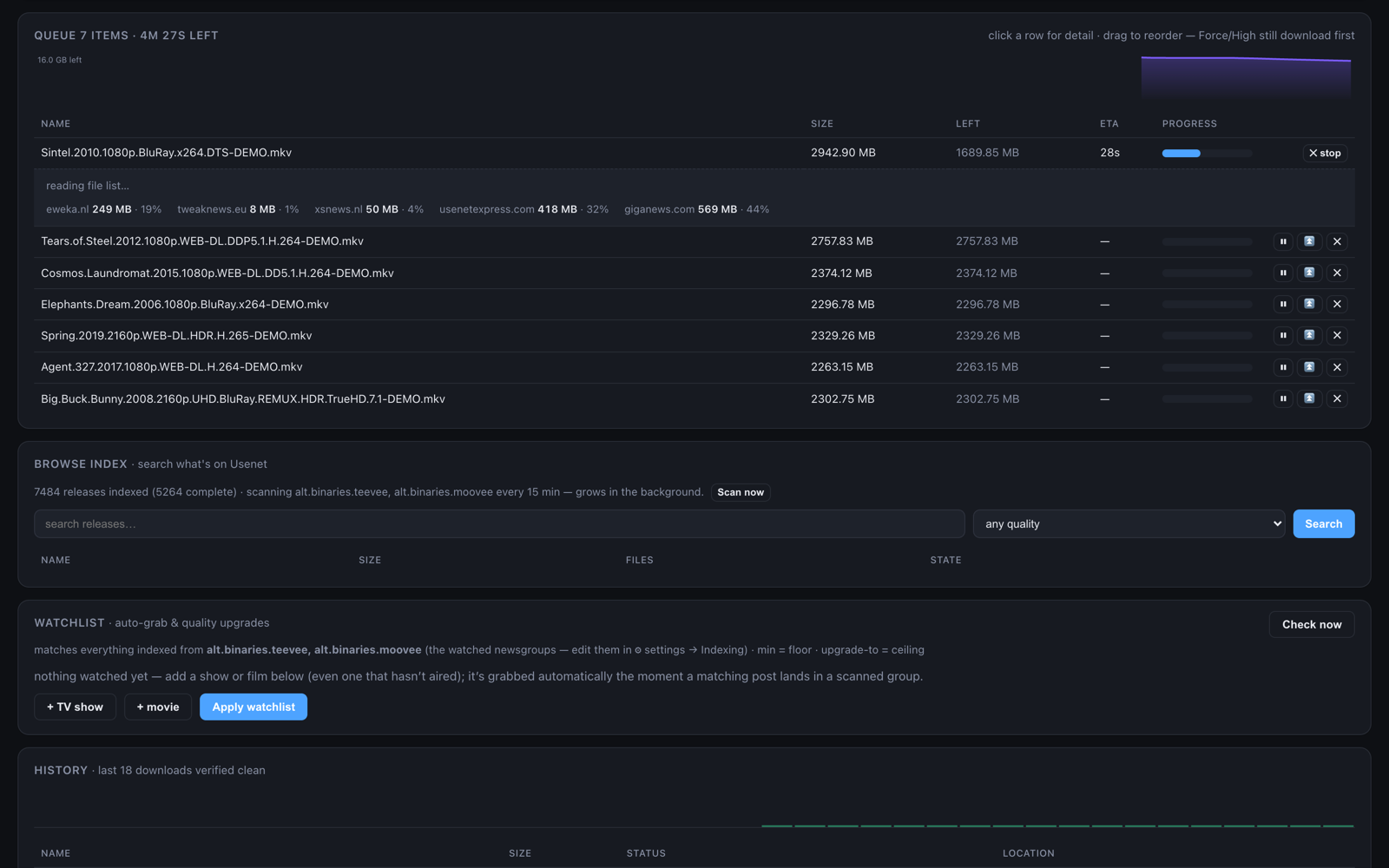
Queue with a per-download detail drawer: per-file progress bars, verify blocks, per-server contribution
Queue drawer: per-file bars, verify blocks, per-server contribution.
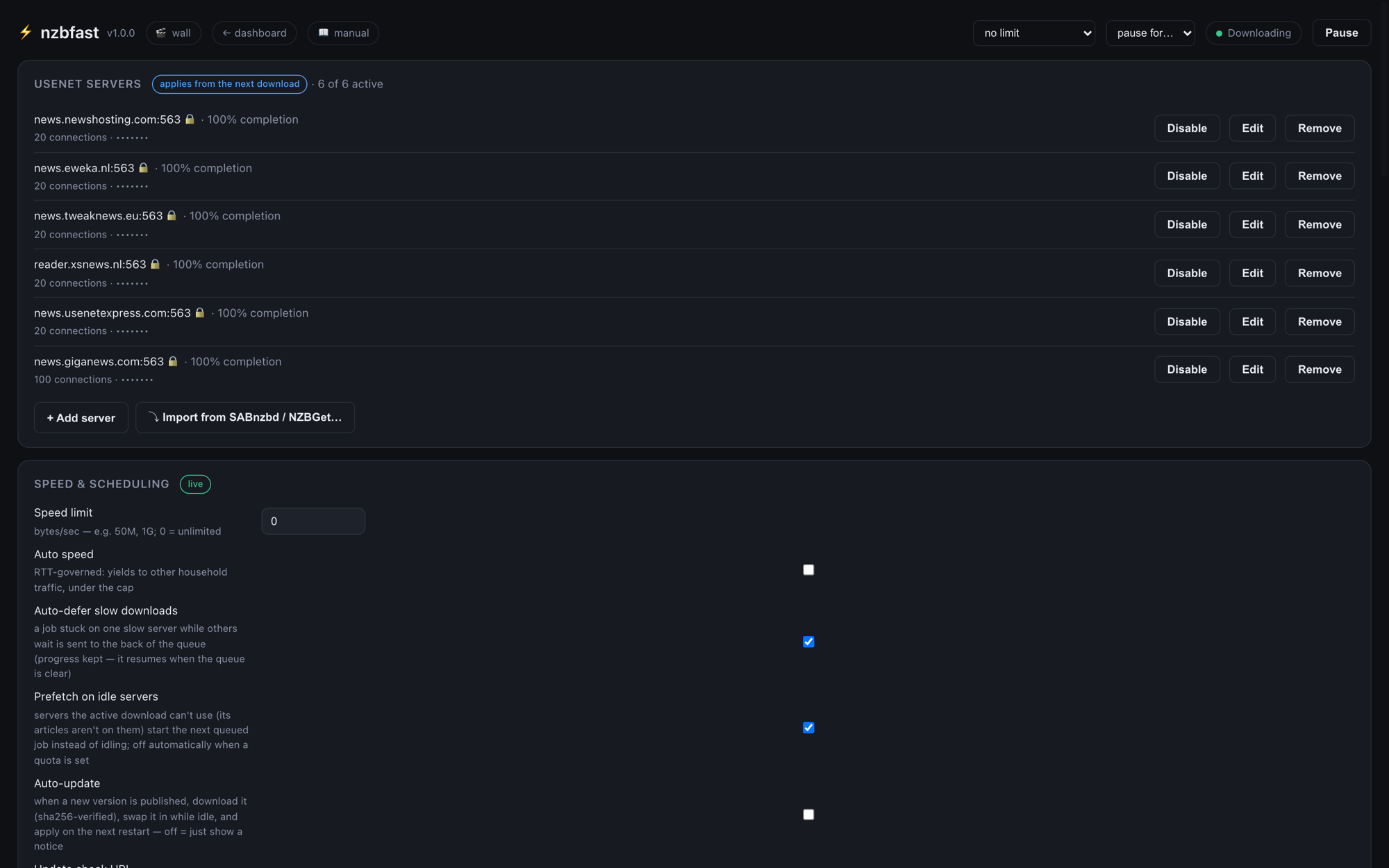
Settings: server editor and live speed/scheduling controls
Every setting editable in the browser. Most apply live.
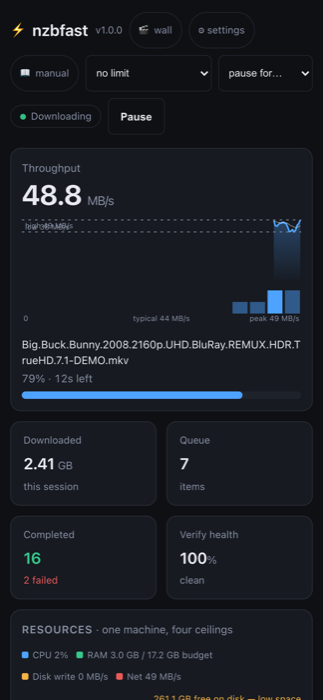
Phone layout of the dashboard
Proper phone layout, same daemon.
  • Live charts, no libraries. Everything polls once a second (a throughput area, per-provider stacked area, a verify-health timeline, queue burn-down, a speed histogram) and the charts widen their time window as you widen the browser.
  • Resource monitor: CPU, RAM against budget, disk writes and network on a single chart, with a low-disk warning.
  • Provider leaderboard. Servers re-sort themselves by live performance, each showing session bytes, connection count, utilisation and reliability.
  • Queue management: drag to reorder, set priority and category inline, open a per-download drawer, pause optimistically, or "pause for N minutes". Pick many rows at once, in the queue or in history, and act on the lot - with the mouse or from the keyboard.
  • History that keeps everything. Finished jobs go to their own store with no row limit, paged and searchable, and they outlive restarts. Age and count limits are there if you want them, and they are off.
  • Everything is configurable in the browser: servers (with live connection tests), speed and schedule, connections/window/decoders, disk and quota, watch folders and scripts, indexing gates, library, RSS, and security with key rotation. Settings survive restarts.
  • HTTPS built in. Point it at a certificate and key and the one listener answers https instead of http, dashboard and API alike. A certificate that is broken or expired refuses startup and names the file, rather than surfacing as a browser error somewhere else later.
  • Diagnostics built in: an in-UI log viewer you can filter by tag and export, a per-download "why is this slow?" answer that names the stage doing the limiting, a system benchmark that finds your network, compute and disk ceilings and tells you what to do about them, the server-diversity analyser, and the connection ladder.
  • Data usage: 14-day stacked per-provider bars, daily history, and lifetime counters for block accounts.
  • 28 languages. The dashboard ships fully localised, right-to-left scripts included; the manual and this site are in 16.
  • Quality of life. Drag and drop a .nzb anywhere, desktop notifications, completion sounds, a first-run wizard, and serve --open.

Deployment