From NZB to a verified file
before others finish downloading.

nzbfast is a Usenet downloader built around a single pass: every byte gets decoded, verified and extracted while it downloads. There's no assembly pass afterwards, nothing left to verify or unpack once it's done. The moment the progress bar fills, the file is finished and provably intact.

8.31 Gbps on a 10 GbE line 190 GB → 4m33s to a verified file RAR volumes never touch disk Half the disk competitors need RAM-budgeted · 0 swaps, ever
Download See the numbers

macOS · Windows · Linux · Docker: one self-contained executable, repair and unpack tools built in.
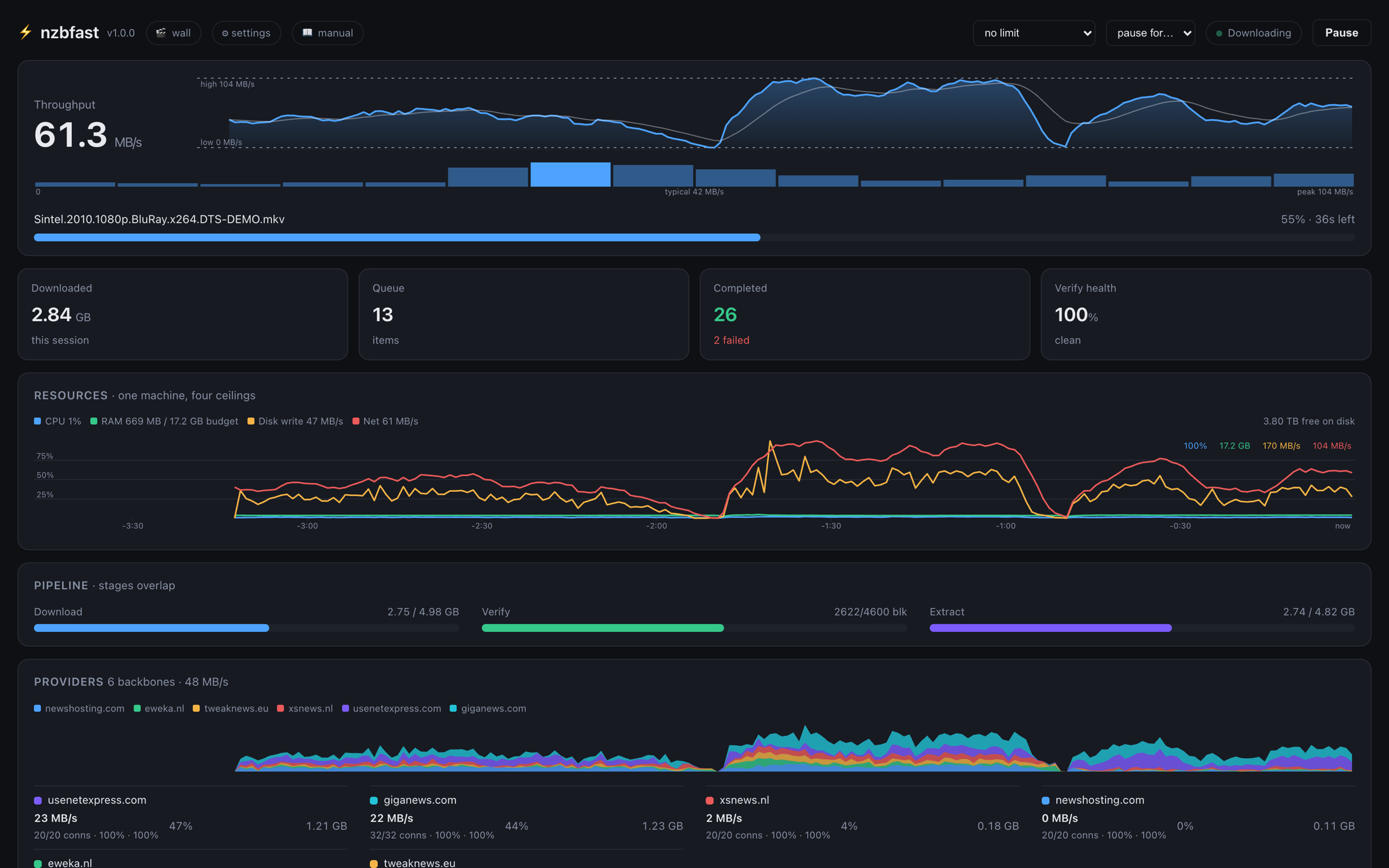
nzbfast dashboard mid-download at 61 MB/s: throughput peaking at 104 MB/s across a full history graph, live resource and per-provider charts, and the download/verify/extract pipeline stages overlapping

Why it's fast

Three ideas the mainstream clients don't fully exploit

This is architecture, not micro-optimisation, and every bit of it is measured in the benchmark log with commands you can re-run.

🔁

Pipelined NNTP

Several article requests stay in flight on each connection, so a round-trip never leaves the socket idle and TCP never lets its congestion window decay between articles. Across four sites we measured +12% to +270% over serial, and a line saturates at 8 connections rather than 30–50.

🚿

The one-pass pipeline

Articles are SIMD-decoded in place and written once, straight to their final offsets, then PAR2-verified out of the same decode buffers. For store-mode RAR posts the contents are extracted during the download, so the volumes never exist as files: disk written comes to content × 1.0.

🕸️

Union availability

An article counts as "missing" only once every configured backbone has turned it down. Block-exact accounting calls the job COMPLETE, REPAIRABLE or IMPOSSIBLE before wasting bytes, pulls just the exact-fit minimum of recovery blocks, and drops hopeless downloads within seconds.

The pipeline

Touch every byte once

Other clients write the archive volumes, read them back to verify, read them a second time to extract, then write the output, roughly 2× the writes and 2× the reads. Here's what nzbfast does instead:

socket ──TLS──▶ rapidyenc SIMD decode (in place - 4.95 GB/s per core)
                   │
                   ├─▶ pwrite at final offset          (plain posts)
                   │      └─ or: RAR-map translate ─▶ pwrite straight into the
                   │         extracted file (store-mode posts - the rar
                   │         volumes never touch disk)
                   ├─▶ PAR2 block hasher - every block MD5-verified from the
                   │      decode buffer; verification finishes with the download
                   └─▶ availability ledger - block-exact health, live
Damaged post? The bad blocks are known the moment their articles fail, so the exact-fit minimum of recovery volumes is pulled during the download (22 fetched for 20 needed, in the bench round) and repair touches only the damaged spans. Impossible post? It gives up in seconds having downloaded next to nothing, before your quota even notices.

Headline features

Everything a serious setup needs

The full list (every knob, every integration) is on the features page.

  • Line-rate downloads: pipelined NNTP measured at 8.31 Gbps on 10 GbE; the fastest client on every clean benchmark leg, at every size.
  • One-pass pipeline: decode, verify and extract overlap; store-mode RAR volumes never hit disk; nested archives unpack in the same pass; needs 1× disk where others need ~2×.
  • Multi-provider union availability: block-exact routing across backbones; preflight verdicts; exact-fit repair; early abort of impossible posts.
  • Memory budget: one global RAM budget with graceful spill tiers. It never swaps your machine: a 190 GB job completes inside a 1 GB budget (~1.1 GB peak RSS).
  • Crash-safe resume: an article-level journal means a crash or kill −9 mid-download costs almost nothing. It resumes, refetching only what wasn't saved.
  • Drop-in APIs: SABnzbd-compatible API and NZBGet JSON-RPC. Sonarr, Radarr, nzb360 and LunaSea work unmodified. One-click import of your SAB/NZBGet config.
  • Built-in indexer: scans your newsgroups into a searchable local index, serves Newznab so your *arr stack can search it too.
  • Poster wall with keyless metadata: artwork, ratings, cast and synopses for everything in your index, with no API keys to sign up for.
  • Watchlist automation: name a show or film (aired or not); it's grabbed the moment it appears, then quality-upgraded until your target is met.
  • A single executable: repair (par2) and unpack (RAR) ride inside the binary. Unzip, run, done, and both match or beat the standalone tools when raced on their own.

Benchmarks

190.6 GB → a verified 167.9 GB file

Same machine, same six providers, runs interleaved back-to-back. What's timed is when a usable, extracted file exists, the only metric that really matters. Every competitor was tuned to its own documented best, right down to switching SABnzbd's pipelining on, which it ships without.

nzbfast4m 33s
NZBGet 26.27m 58s · +75%
SABnzbd 5.0.419m 32s · +329%
rustnzb 1.3.4no usable file

190.6 GB NZB → a single 167.9 GB mkv, M1 Ultra on 10 GbE, 6 providers × 8 connections. The same job also finishes inside a 1 GB memory budget. Full tables, all seven scenarios, and the legs we don't win (plus how to reproduce them) are on the benchmarks page.

Fits your stack

Point your existing tools at it

Sonarr / Radarr

It carries the full SABnzbd-compatible API, so you add nzbfast as a "SABnzbd" download client and it just works: grabs, categories, priorities, retries, post-processing scripts on the SAB_* contract, history. The Newznab facade goes one further and lets the *arrs search your local index as if it were an indexer.

nzb360 / LunaSea

The daemon speaks NZBGet's JSON-RPC as well, so the popular phone remotes drive nzbfast without any changes. The dashboard itself also has a proper phone layout for when you're away from the big screen.

Coming from SAB or NZBGet?

One click pulls your servers in from an existing SABnzbd or NZBGet install, and it'll read sabnzbd.ini directly if that's what it finds. Watch folders, filtered RSS feeds, smart folders with TV filing and cleanup rules all come along too.

Try it in the next two minutes

Unzip, double-click the launcher, answer three questions (or let it find your existing SABnzbd config) and the dashboard opens. Your first download lands inside two minutes.